 language
 english


PCBA Test Fixture Guide for Functional Testing and Production
A PCBA test fixture helps manufacturers test assembled circuit boards quickly, consistently, and safely during prototype validation, small-batch production, or mass production. Instead of touching probes by hand each time, the fixture gives the PCBA a repeatable test interface for power, signals, programming, communication, and functional checks.
For engineers and buyers, the real question is not only “What is a PCBA test fixture?” The more practical question is: Does this PCBA project need a fixture, what should be tested, and how can the fixture reduce production risk?
Best Technology supports one-stop PCB manufacturing, component sourcing, PCBA assembly, programming support, testing coordination, inspection, and delivery. If your project requires PCBA testing, functional verification, programming, or fixture planning, you can send Gerber files, BOM, CPL, test requirements, and assembly notes to sales@bestpcb.vn for engineering review before production.
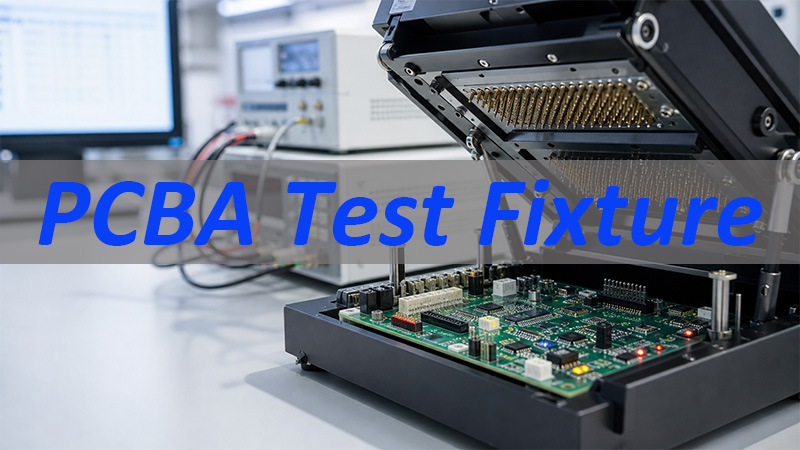
What Is a PCBA Test Fixture?
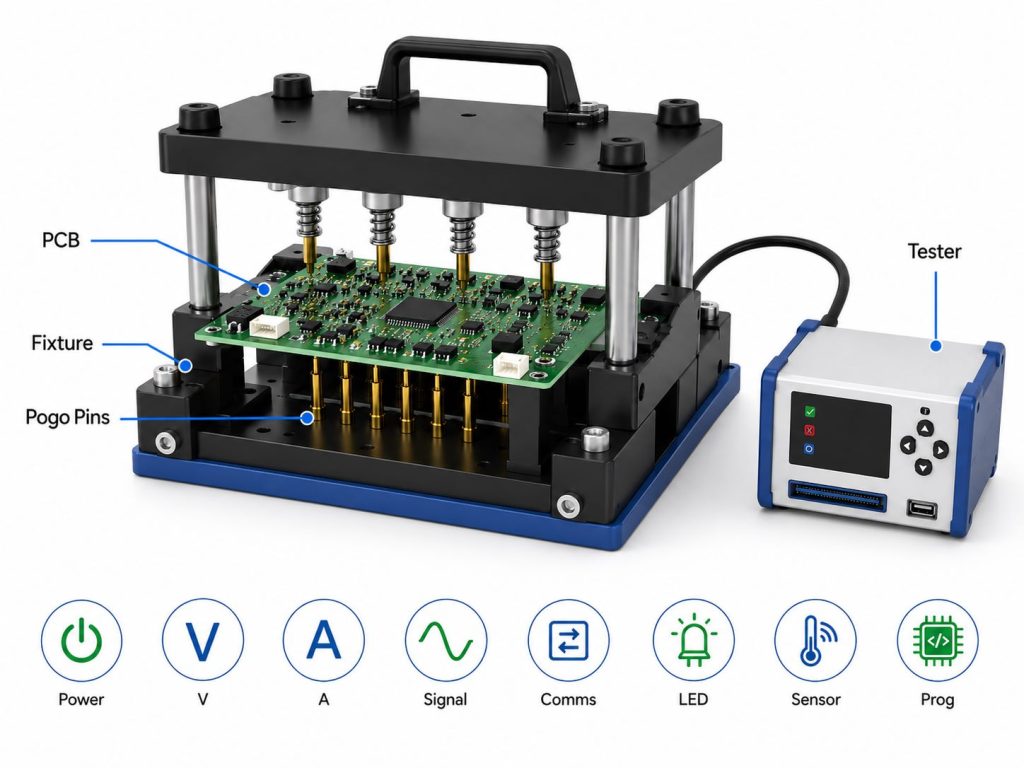
A PCBA test fixture is a customized tool used to connect an assembled PCB to test equipment. It holds the board in position and makes electrical contact with test points, connectors, pads, or pins so the board can be tested repeatedly.
A fixture may be used to check:
- power input and output
- voltage rails
- current consumption
- signal continuity
- communication ports
- relay or switch function
- LED or display response
- sensor interface
- firmware programming
- functional test results
For one or two prototype boards, manual testing may be enough. But once the quantity increases, manual probing becomes slow and risky. A PCBA test fixture improves consistency because every board is contacted in the same way.
When Does a PCBA Project Need a Test Fixture?
A PCBA project usually needs a test fixture when the board must be tested more than a few times or when the test process must be repeatable.
A fixture becomes more valuable when the project has:
- medium or high production quantity
- many test points
- programming requirements
- connector or cable testing
- power-on functional testing
- communication testing
- customer-specific test steps
- limited space for manual probing
- high cost of failure after shipment
- strict delivery or quality requirements
For early prototypes, engineers may only need a simple test setup. For pilot production, the test method should become more stable. For mass production, a production test fixture can help reduce human error, speed up testing, and make results easier to record.
PCBA Test Fixture vs PCBA Test Jig
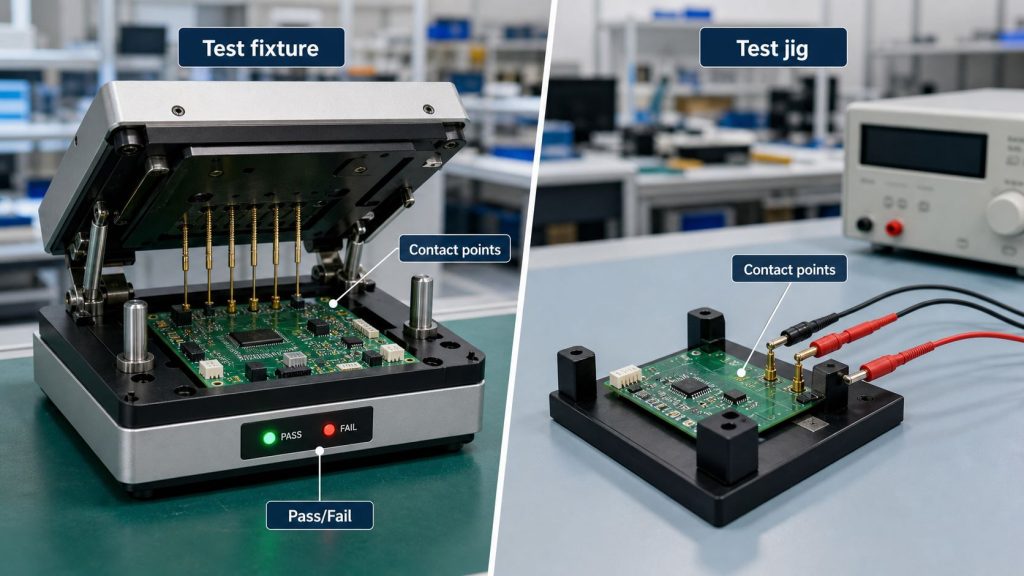
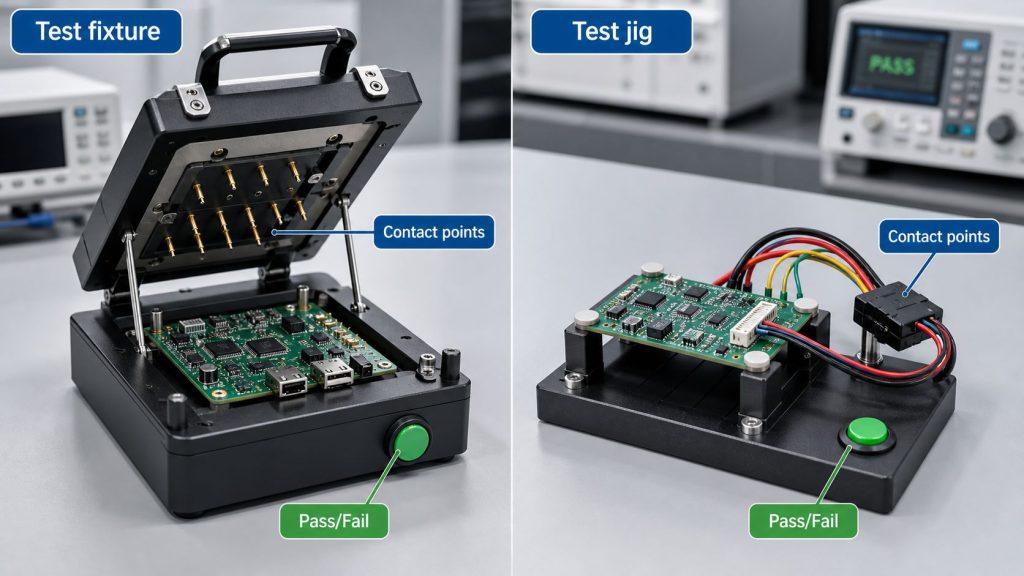
The terms PCBA test fixture and PCBA test jig are often used together. In many factories, customers may use either term to describe the tool used for testing assembled boards.
In practical use:
| Term | Common Meaning |
|---|---|
| PCBA test fixture | More formal term for a custom test tool |
| PCBA test jig | Often used for simpler or production-floor test tools |
| Test fixture kit | A modular or semi-custom fixture platform |
| Functional test fixture | Fixture used to confirm product function |
| ICT fixture | Fixture used for in-circuit testing |
| Bed of nails fixture | Fixture using many spring-loaded test pins |
The name is less important than the test purpose. Before production, the customer and manufacturer should confirm what the fixture needs to do, which points it must contact, and what pass/fail criteria will be used.
Functional Test Fixture for PCBA Validation
A functional test fixture checks whether the assembled board works as expected after SMT, through-hole assembly, programming, or final assembly.
Functional testing may include:
- powering on the board
- checking current draw
- testing buttons, LEDs, relays, motors, or sensors
- verifying USB, UART, CAN, I2C, SPI, Ethernet, or wireless module response
- loading or checking firmware
- simulating input/output signals
- confirming product-level behavior
This is different from only checking whether solder joints look good. AOI, X-Ray, and visual inspection can help find assembly defects, but functional testing checks whether the PCBA can actually operate.
For Best Technology, functional test planning starts with the customer’s files and test notes. If the customer provides a test procedure, firmware file, test software, or pass/fail standard, the engineering team can review how the test should be arranged during PCBA production.
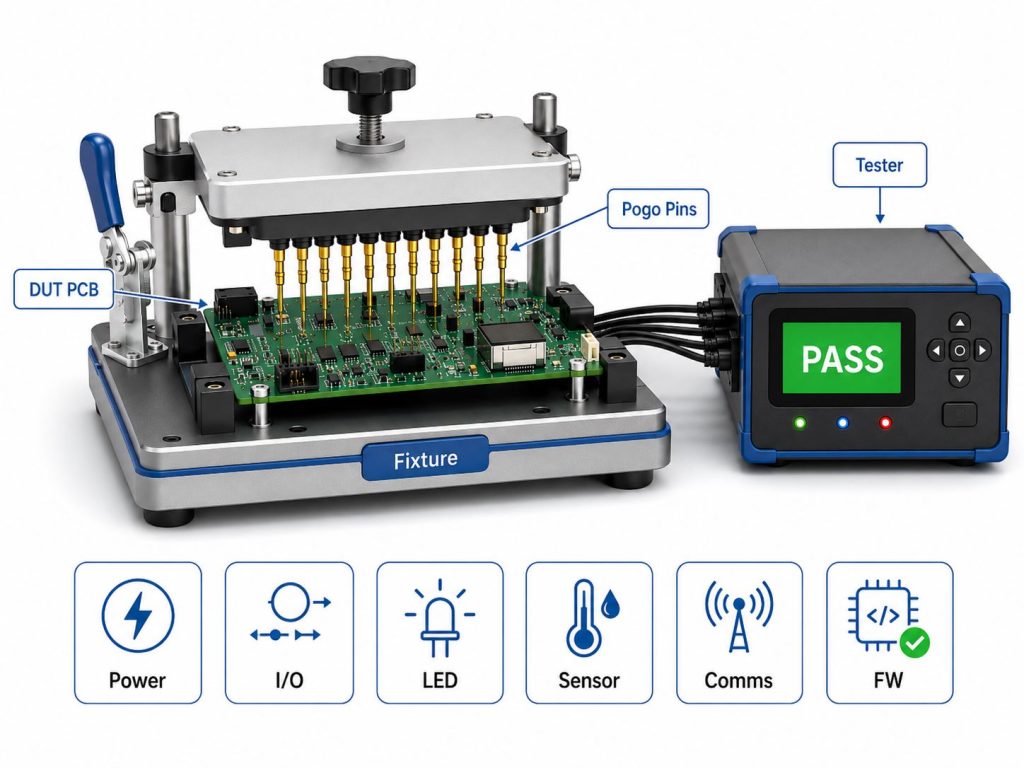
Bed of Nails Test Fixture in PCBA Testing
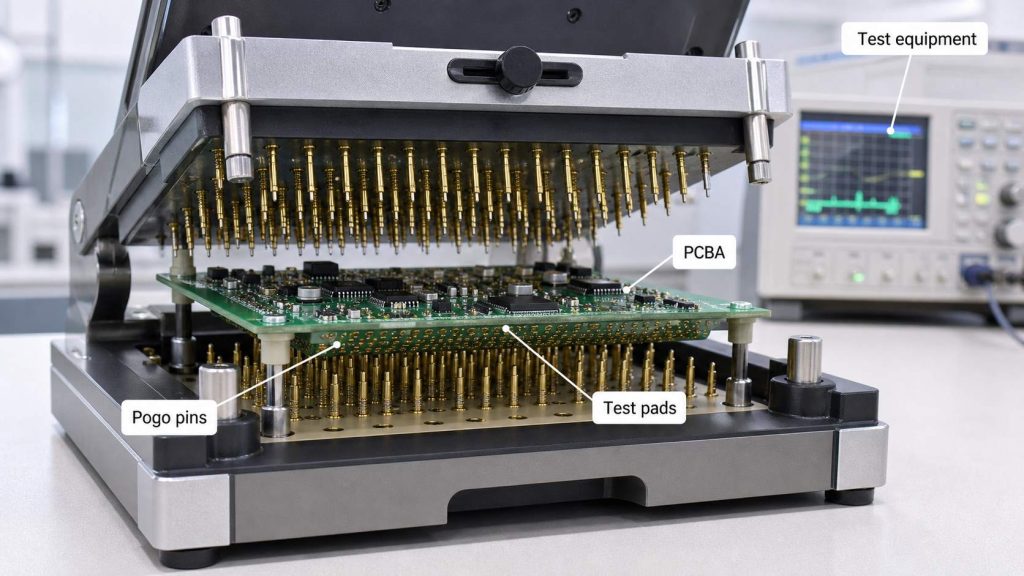
A bed of nails test fixture uses many spring-loaded pogo pins to contact pads or test points on the PCB. When the board is pressed into the fixture, the pins touch the selected points and connect the PCBA to test equipment.
This type of fixture is useful when the board has many test points and the production quantity justifies fixture preparation.
A bed of nails fixture may contact:
- power rails
- ground points
- signal lines
- programming pads
- communication pads
- component pins
- connector-related nets
- test pads designed for ICT or FCT
The PCB layout should reserve enough test pads if a bed of nails fixture is expected. If test points are too small, too close, covered by components, or placed in poor locations, the fixture becomes harder to build and less reliable.
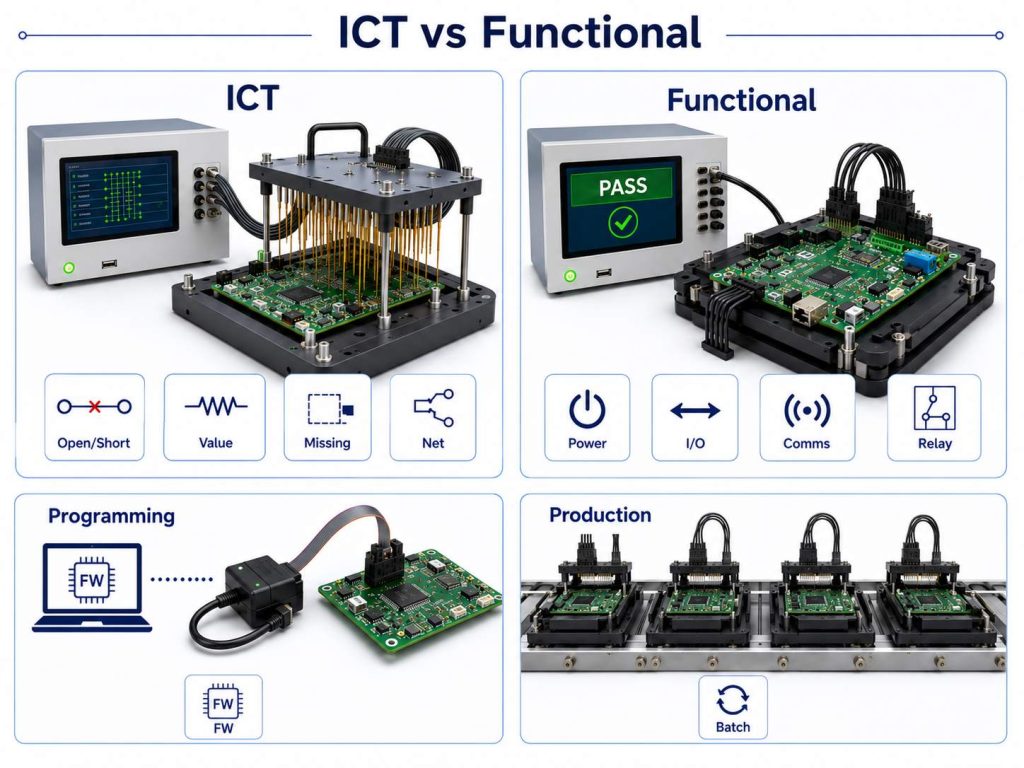
ICT Test Fixture vs Functional Test Fixture
An ICT test fixture and a functional test fixture serve different purposes.
| Fixture Type | Main Purpose |
|---|---|
| ICT test fixture | Checks component-level or net-level assembly issues |
| Functional test fixture | Checks whether the assembled board works |
| Programming fixture | Loads firmware or verifies programming access |
| Production test fixture | Supports repeatable testing during batch production |
ICT may help find open circuits, shorts, wrong components, missing parts, wrong values, or soldering defects. Functional testing focuses more on final board behavior.
A project may need only one type of test, or it may need several steps. For example, a control board may require electrical inspection, firmware programming, relay output testing, communication testing, and final packing inspection.
Best Technology does not decide the customer’s product logic. The customer should provide the intended test requirements, firmware, and functional standard. Our role is to help coordinate the manufacturing, assembly, programming, fixture, and inspection details so the test process fits the PCBA production flow.
Production Test Fixture for Small-Batch and Mass PCBA
A production test fixture is used when the test process must be repeated across many boards. It helps reduce operator variation and makes the test process easier to control.
For small-batch and mass PCBA, a fixture can help with:
- faster board loading and unloading
- stable contact with test points
- reduced manual probing errors
- clearer pass/fail judgment
- safer power-on testing
- better consistency between operators
- easier test record management
- smoother transition from prototype to production
A fixture is especially useful for products such as industrial controllers, power modules, IoT devices, LED control boards, medical electronics, automotive modules, communication boards, and consumer electronics.
For urgent prototype validation, a simple fixture may be enough. For stable production, the fixture should be reviewed more carefully, including mechanical positioning, test pin location, board support, connector access, operator safety, and test software.
What Files Are Needed for a PCBA Test Fixture?
To prepare or review a PCBA test fixture, the manufacturer needs more than Gerber files.
Useful files and information include:
- Gerber or ODB++ files
- BOM
- CPL / centroid file
- schematic, if available for test review
- assembly drawing
- test point list
- programming file or firmware notes
- test procedure
- required voltage and current limits
- communication interface notes
- pass/fail criteria
- connector and cable requirements
- fixture contact location requirements
- packing and labeling notes
If the customer only says “please test the board,” the factory may not know what “pass” means. A better instruction is specific: what should be powered, what should be measured, what software should be used, and what result is acceptable.
Best Technology PCBA Test Fixture Case Study
A European customer needed a small-batch PCBA build for an industrial control module. The board was not only assembled with SMT components; it also needed firmware programming and output verification before shipment.
Project requirements
- Application: industrial control module
- Production stage: prototype to small-batch validation
- PCB and PCBA: quick PCB fabrication, BOM sourcing, SMT assembly, programming support, and test coordination
- Key components: MCU, connectors, indicator LEDs, power input circuit, communication interface
- Test needs: power-on check, firmware loading, current check, communication response, output verification
- Delivery requirement: fast PCBA delivery for engineering validation
Main risks
- Wrong programming access could delay the whole batch.
- Manual probing could damage pads or create inconsistent results.
- Connector direction and polarity needed to be confirmed before SMT.
- Power-on testing needed controlled voltage and current limits.
- Test notes had to stay visible from SMT to final packing.
Best Technology support
- Reviewed Gerber, BOM, CPL, assembly drawing, and programming notes together.
- Checked test pad access and connector orientation before SMT.
- Coordinated component sourcing through the approved BOM.
- Arranged SMT assembly, inspection, and post-assembly cleaning.
- Prepared the production team with programming and functional test notes.
- Used clear pass/fail checkpoints before individual packing.
Result
The customer received assembled boards that were ready for engineering validation, not only bare assembled PCBAs. The value was in the controlled handoff: PCB fabrication, BOM sourcing, SMT assembly, programming notes, test fixture planning, inspection, and packing were kept under one workflow.
For projects moving from prototype to small batch, this kind of coordination helps reduce decision pressure. The customer does not need to manage PCB fabrication, sourcing, assembly, and test preparation separately.
Why Choose Best Technology for PCBA Testing Support?
Best Technology is suitable for PCBA projects where testing is part of the full manufacturing path, not a separate afterthought.
What the team can coordinate
- custom PCB manufacturing
- component sourcing
- SMT assembly
- through-hole assembly
- programming support based on customer files
- functional test coordination
- fixture planning discussion
- inspection and packing
- prototype and small-batch production
- PCBA delivery support
Why this matters
- One business contact works with a technical support team.
- DFM review can be done before production.
- BOM risks can be checked before SMT scheduling.
- Experienced PCB/PCBA engineers can review process fit.
- The same workflow connects fabrication, sourcing, assembly, and testing.
- Digital workshop tracking helps follow materials, batches, cycle time, and progress.
- Quality support includes ISO9001, ISO13485, IATF16949, AS9100D, RoHS, REACH, and UL-related documentation.
Best Technology has about 20 years of PCB and PCBA experience, supports prototype and small-batch production, and works with a large supply chain network. For customers who need PCBA testing, the important point is not only whether a test fixture exists. The important point is whether the test requirement is understood before production starts.
FAQs About PCBA Test Fixture
1. What is a PCBA test fixture?
A PCBA test fixture is a custom tool used to connect an assembled circuit board to test equipment. It helps test power, signals, programming, communication, and functional performance more consistently.
2. Is a PCBA test fixture the same as a test jig?
They are often used similarly. “Fixture” is usually the more formal term, while “test jig” is often used for simpler shop-floor tools. The real difference depends on the test purpose and complexity.
3. When should I use a functional test fixture?
A functional test fixture is useful when the assembled board must be powered on and checked for real operation, such as communication, LED response, relay output, sensor input, programming, or product-level behavior.
4. What is a bed of nails test fixture?
A bed of nails test fixture uses many spring-loaded pogo pins to contact test pads on the PCB. It is useful for repeatable electrical testing when the board has enough accessible test points.
5. What should I provide before PCBA testing?
You should provide Gerber or ODB++ files, BOM, CPL, assembly drawing, test points, firmware or programming notes, test procedure, voltage/current limits, and pass/fail criteria.
In summary, a PCBA test fixture is not only a testing accessory. For many PCBA projects, it is part of the production control plan. It helps make programming, power-on testing, functional checks, and final inspection more repeatable.
If your PCBA project needs fixture planning, functional testing, programming support, or production test coordination, please send your files and test notes to sales@bestpcb.vn. Best Technology can help review the manufacturing and testing path before your board moves into production.